Table of Contents
COMfps Sensitivity / Mouse Settings:
| DPI | 800 | 0.27 (Scoped)1 |
| eDPI | 216 | |
| Polling Rate | 1000 | 6 (Windows Pointer Speed) |
COMfps Key bindings:
| Crouch | Left Ctrl |
| Walk | Left Shift |
| Jump | Scroll/Spacebar |
| Ability 1 | Z |
| Ability 2 | T |
| Ability 3 | Q |
| Ultimate Ability | X |
| Primary Weapon | 1 |
| Secondary Weapon | 2 |
| Melee | 3 |
COMfps Valorant Crosshair Settings:
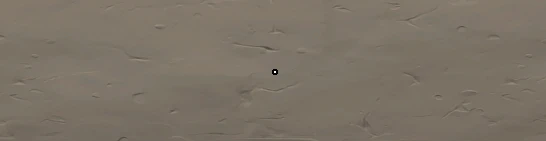
| Color | White |
| Outlines | ON / 1 / 1 |
| Center Dot | ON / 1 / 2 |
| Inner Lines | ON / 1 / 4 / 2 / 3 |
| Outer Lines | OFF / 0 / 0 / 0 / 0 |
| Fade / Movement / Firing Error | OFF / OFF |
| Crosshair Code | 0;s;1;P;u;0000FFFF;o;1;d;1;f;0;0l;2;0v;4;0o;0;0a;1;0f;0;1b;0;S;b;1;c;8;t;000000FF;s;0.713;o;1 |
COMfps Valorant Video Settings
| Resolution | 1920×1080 |
| Aspect Ratio | 16:9 |
| Nvidia Reflex | Enabled + Boost |
COMfps Valorant Graphics Quality
| Material Quality | Low | Anti-Aliasing | Off |
| Detail Quality | Low | Anisotropic Filtering | Off |
| Texture Quality | Low | Improve Clarity | Off |
| UI Quality | Low | Bloom | Off |
| Vignette | Off | Distortion | Off |
| Vsync | Off | First Person Shadows | Off |
COMfps Radar settings
| Rotate | Rotate / Based on Side |
| Keep Player Centered | Off |
| Minimap Size | 1.1 |
| Minimap Zoom | 0.9 |
| Minimap Vision Cones | On |
| Show Map Region Names | Always |
COMfps Setup:
| CPU | AMD Ryzen 9 5950X |
| GPU | NVIDIA GeForce RTX 3070 |
| KEYBOARD | Wooting 60HE |
| MONITOR | BenQ XL2546 |
| MOUSE | Logitech G Pro Superlight |
| MOUSEPAD | Gamesense Rush Mousepad |